Module 4: Vision-Language-Action (VLA) Models
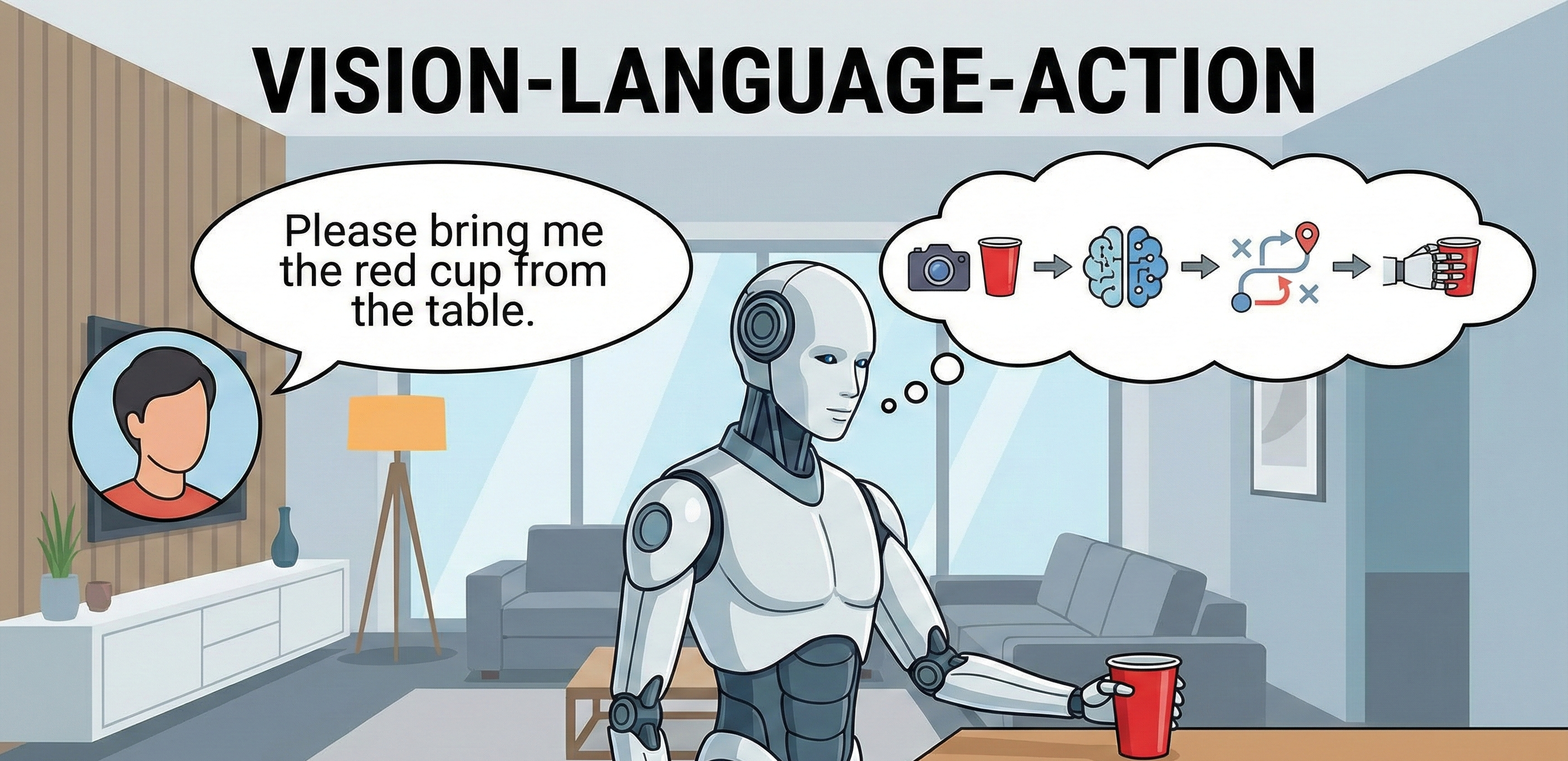
Learning Objectives
- Understand the fundamental principles of Vision-Language-Action (VLA) models and their role in embodied AI
- Implement VLA systems that translate natural language commands into robotic actions
- Integrate Whisper for speech-to-text processing and LLMs for cognitive planning
- Design cognitive planning systems that translate natural language into sequences of ROS 2 actions
- Explore OpenVLA and other open-source VLA frameworks for robotic manipulation
- Evaluate the challenges and opportunities in VLA-based human-robot interaction
Introduction to Vision-Language-Action (VLA) Models
Vision-Language-Action (VLA) models represent a paradigm shift in robotics, enabling robots to understand complex, natural language commands and translate them into appropriate physical actions. Unlike traditional robotic systems that require explicit programming for each task, VLA models leverage large-scale pretraining on vision-language datasets to develop a general understanding of the physical world, which can then be adapted to control robotic systems.
VLA models combine three critical modalities: visual perception (understanding the environment), language comprehension (interpreting human commands), and action generation (executing physical tasks). This integration allows robots to perform complex tasks based on natural language instructions, bridging the gap between human communication and robotic execution.
The breakthrough in VLA models comes from foundation models trained on massive datasets of image-text pairs, which are then extended to include action sequences. This pretraining enables the models to understand spatial relationships, object affordances, and the connection between language and physical actions.
VLA Architecture and Components
Multi-Modal Foundation Models
VLA systems typically build upon multi-modal foundation models that can process visual and textual inputs simultaneously. These models often use transformer architectures with shared representations across modalities, enabling them to understand the relationship between visual scenes and language descriptions.
Visual Processing Pipeline
The visual processing component handles:
- Object detection and recognition
- Scene understanding and spatial relationships
- Depth estimation and 3D scene reconstruction
- Visual affordance detection (what actions are possible with objects)
Language Understanding Module
The language component processes:
- Natural language parsing and semantic understanding
- Intent recognition from complex commands
- Contextual understanding based on visual input
- Task decomposition into executable steps
Action Generation and Planning
The action component:
- Maps language commands to robot actions
- Plans sequences of actions to achieve goals
- Ensures safety and feasibility of planned actions
- Handles feedback and error recovery
VLA Implementation with Whisper and LLMs
Speech-to-Text Processing with Whisper
Whisper is an open-source automatic speech recognition (ASR) system that converts spoken language into text. For VLA applications, Whisper serves as the initial processing step that converts natural language commands into text format that can be processed by language models.
import openai
import rospy
from std_msgs.msg import String
import speech_recognition as sr

class VoiceCommandProcessor:
    def __init__(self):
        # Initialize ROS node
        rospy.init_node('voice_command_processor')

        # Publisher for processed commands
        self.command_pub = rospy.Publisher('/vla/command', String, queue_size=10)

        # Initialize speech recognizer
        self.recognizer = sr.Recognizer()
        self.microphone = sr.Microphone()

        # Set up energy threshold for ambient noise
        with self.microphone as source:
            self.recognizer.adjust_for_ambient_noise(source)

    def listen_and_transcribe(self):
        """Listen for voice commands and transcribe to text"""
        try:
            with self.microphone as source:
                rospy.loginfo("Listening for voice command...")
                audio = self.recognizer.listen(source, timeout=5)

            # Use Whisper for transcription (using OpenAI API)
            # In practice, you could use local Whisper models
            try:
                # Using OpenAI Whisper API
                transcript = self.recognizer.recognize_google(audio)
                rospy.loginfo(f"Transcribed: {transcript}")
                return transcript
            except sr.UnknownValueError:
                rospy.logerr("Could not understand audio")
                return None
            except sr.RequestError as e:
                rospy.logerr(f"Could not request results from Whisper; {e}")
                return None

        except sr.WaitTimeoutError:
            rospy.loginfo("No speech detected within timeout")
            return None

    def process_command(self, text_command):
        """Process the transcribed text command"""
        if text_command:
            # Publish the command for further processing
            cmd_msg = String()
            cmd_msg.data = text_command
            self.command_pub.publish(cmd_msg)
            return True
        return False

def main():
    processor = VoiceCommandProcessor()

    rate = rospy.Rate(1)  # Process commands once per second

    while not rospy.is_shutdown():
        command = processor.listen_and_transcribe()
        if command:
            processor.process_command(command)
        rate.sleep()

if __name__ == '__main__':
    try:
        main()
    except rospy.ROSInterruptException:
        pass
LLM Integration for Cognitive Planning
Large Language Models (LLMs) serve as the cognitive planning layer in VLA systems, translating high-level language commands into sequences of specific robot actions. This involves:
- Task Decomposition: Breaking complex commands into simpler subtasks
- Action Mapping: Converting language concepts to robot-specific actions
- Context Reasoning: Using environmental context to inform action selection
- Plan Validation: Ensuring planned actions are safe and feasible
import openai
import json
from typing import List, Dict, Any

class VLACognitivePlanner:
    def __init__(self, api_key: str):
        openai.api_key = api_key
        self.system_prompt = """
        You are a cognitive planner for a Vision-Language-Action (VLA) robotic system.
        Your role is to decompose natural language commands into sequences of specific robot actions.
        Each action should be a ROS 2 service call, topic message, or action goal.

        Available action types:
        - Navigation: move_to_location(location_name)
        - Manipulation: pick_object(object_name), place_object(object_name, location)
        - Perception: look_at_object(object_name), scan_environment()
        - Interaction: speak(text), listen_for_response()
        - Conditional: if_condition(condition, action)

        Always return your plan as a JSON array of actions with the format:
        [
            {
                "action": "action_type",
                "parameters": {"param1": "value1", ...},
                "description": "Brief description of the action"
            }
        ]
        """

    def plan_actions(self, command: str, environment_context: Dict[str, Any]) -> List[Dict[str, Any]]:
        """
        Plan a sequence of actions based on the command and environment context
        """
        user_prompt = f"""
        Command: {command}

        Environment Context: {json.dumps(environment_context, indent=2)}

        Please provide a step-by-step plan to execute this command.
        """

        try:
            response = openai.ChatCompletion.create(
                model="gpt-3.5-turbo",
                messages=[
                    {"role": "system", "content": self.system_prompt},
                    {"role": "user", "content": user_prompt}
                ],
                temperature=0.1,
                max_tokens=1000
            )

            # Extract the JSON response
            response_text = response.choices[0].message['content'].strip()

            # Clean the response to extract JSON
            if "```json" in response_text:
                response_text = response_text.split("```json")[1].split("```")[0]
            elif "```" in response_text:
                response_text = response_text.split("```")[1].split("```")[0]

            plan = json.loads(response_text)
            return plan

        except Exception as e:
            rospy.logerr(f"Error in cognitive planning: {e}")
            return []

    def validate_plan(self, plan: List[Dict[str, Any]], environment_context: Dict[str, Any]) -> bool:
        """
        Validate that the planned actions are feasible in the current environment
        """
        # Basic validation - check if required objects/locations exist
        for action in plan:
            if action['action'] in ['pick_object', 'place_object']:
                obj_name = action['parameters'].get('object_name')
                if obj_name and obj_name not in environment_context.get('visible_objects', []):
                    rospy.logwarn(f"Object {obj_name} not visible in environment")
                    return False
            elif action['action'] == 'move_to_location':
                location = action['parameters'].get('location_name')
                if location and location not in environment_context.get('navigable_locations', []):
                    rospy.logwarn(f"Location {location} not navigable")
                    return False
        return True

# Example usage
def example_usage():
    planner = VLACognitivePlanner("your-api-key")

    command = "Please bring me the red cup from the kitchen counter and place it on the dining table"

    environment_context = {
        "visible_objects": ["red cup", "blue mug", "kitchen counter", "dining table"],
        "navigable_locations": ["kitchen", "dining room", "living room"],
        "robot_position": "living room"
    }

    plan = planner.plan_actions(command, environment_context)

    if planner.validate_plan(plan, environment_context):
        print("Validated Plan:")
        for i, action in enumerate(plan):
            print(f"{i+1}. {action['description']}")
    else:
        print("Plan validation failed")
ROS 2 Action Execution
The final component executes the planned actions using ROS 2 interfaces:
import rclpy
from rclpy.action import ActionClient
from rclpy.node import Node
from geometry_msgs.msg import PoseStamped
from std_msgs.msg import String
from move_base_msgs.msg import MoveBaseAction, MoveBaseGoal
from actionlib_msgs.msg import GoalStatus

class VLAActionExecutor(Node):
    def __init__(self):
        super().__init__('vla_action_executor')

        # Subscribe to command plans
        self.plan_sub = self.create_subscription(
            String, '/vla/plan', self.plan_callback, 10)

        # Action client for navigation
        self.nav_client = ActionClient(self, MoveBaseAction, 'move_base')

        # Publishers for manipulation commands
        self.manip_pub = self.create_publisher(String, '/manipulation/command', 10)

        self.current_plan = None
        self.plan_index = 0

    def plan_callback(self, msg):
        """Receive a plan and start execution"""
        try:
            plan = json.loads(msg.data)
            self.current_plan = plan
            self.plan_index = 0
            self.execute_next_action()
        except json.JSONDecodeError:
            self.get_logger().error("Invalid plan format")

    def execute_next_action(self):
        """Execute the next action in the plan"""
        if not self.current_plan or self.plan_index >= len(self.current_plan):
            self.get_logger().info("Plan execution complete")
            return

        action = self.current_plan[self.plan_index]

        if action['action'] == 'move_to_location':
            self.execute_navigation(action['parameters'])
        elif action['action'] == 'pick_object':
            self.execute_manipulation(action['parameters'], 'pick')
        elif action['action'] == 'place_object':
            self.execute_manipulation(action['parameters'], 'place')
        # Add more action types as needed

    def execute_navigation(self, params):
        """Execute navigation action"""
        goal = MoveBaseGoal()

        # Convert location name to coordinates (simplified)
        location_coords = self.get_coordinates_for_location(params['location_name'])

        goal.target_pose.header.frame_id = "map"
        goal.target_pose.header.stamp = self.get_clock().now().to_msg()
        goal.target_pose.pose = location_coords

        # Wait for action server
        self.nav_client.wait_for_server()

        # Send goal
        future = self.nav_client.send_goal_async(goal)
        future.add_done_callback(self.navigation_done_callback)

    def navigation_done_callback(self, future):
        """Handle completion of navigation goal"""
        goal_handle = future.result()
        if goal_handle.status == GoalStatus.SUCCEEDED:
            self.get_logger().info("Navigation succeeded")
            self.plan_index += 1
            self.execute_next_action()
        else:
            self.get_logger().error("Navigation failed")
            # Handle failure appropriately

    def execute_manipulation(self, params, action_type):
        """Execute manipulation action"""
        cmd_msg = String()
        cmd_msg.data = f"{action_type} {params['object_name']}"
        self.manip_pub.publish(cmd_msg)

        # In a real system, you would wait for completion
        # For now, we'll just proceed to next action after a delay
        timer = self.create_timer(2.0, self.manipulation_completed)

    def manipulation_completed(self):
        """Handle completion of manipulation action"""
        self.plan_index += 1
        self.execute_next_action()

    def get_coordinates_for_location(self, location_name):
        """Convert location name to coordinates (simplified)"""
        # This would typically come from a map or semantic localization system
        locations = {
            "kitchen": [1.0, 2.0, 0.0],
            "dining room": [3.0, 1.0, 0.0],
            "living room": [0.0, 0.0, 0.0]
        }
        coords = locations.get(location_name, [0.0, 0.0, 0.0])

        pose = PoseStamped()
        pose.position.x = coords[0]
        pose.position.y = coords[1]
        pose.position.z = coords[2]
        return pose

def main(args=None):
    rclpy.init(args=args)
    executor = VLAActionExecutor()

    try:
        rclpy.spin(executor)
    except KeyboardInterrupt:
        pass
    finally:
        executor.destroy_node()
        rclpy.shutdown()

if __name__ == '__main__':
    main()
OpenVLA and Open-Source VLA Frameworks
OpenVLA (Open Vision-Language-Action) represents a significant advancement in open-source VLA research, providing pre-trained models that can control robotic arms based on visual input and language commands. OpenVLA models are trained on diverse robotic datasets and can generalize to new tasks and environments without additional training.
Key features of OpenVLA:
- End-to-end trainable vision-language-action models
- Zero-shot generalization to new tasks
- Support for various robotic platforms
- Integration with ROS 2 for seamless deployment
Challenges in VLA Systems
Grounding Language to Perception
One of the primary challenges in VLA systems is correctly grounding language commands to the current visual scene. This requires understanding spatial relationships, object affordances, and contextual information.
Safety and Robustness
VLA systems must ensure that planned actions are safe and appropriate for the current environment. This includes avoiding collisions, respecting physical constraints, and handling ambiguous commands safely.
Real-time Performance
VLA systems need to process visual input, language commands, and generate actions in real-time for practical robotic applications. This requires efficient model architectures and optimization techniques.
Integration with ROS 2 Ecosystem
VLA systems integrate with ROS 2 through:
- Action Servers: For long-running tasks like navigation and manipulation
- Topics: For continuous data streams like sensor data and robot state
- Services: For discrete operations and configuration changes
- Parameters: For runtime configuration of VLA models
Try it yourself
-
Set up the VLA environment:
# Install required dependencies
pip install openai openai-whisper torch torchvision torchaudio
pip install ros2-interfaces -
Implement the voice command processor:
- Create a ROS 2 node that captures audio using a microphone
- Use Whisper for speech-to-text conversion
- Publish transcribed commands to a ROS topic
-
Create the cognitive planner:
- Implement the LLM-based planning system
- Test with simple commands like "move forward" or "pick up the object"
- Add environment context awareness
-
Connect to a simulated robot:
- Use Gazebo or Isaac Sim with a mobile manipulator
- Implement the action execution node
- Test the complete VLA pipeline
-
Experiment with different LLMs:
- Try various language models (GPT, Claude, open-source alternatives)
- Compare planning quality and response times
- Evaluate safety and robustness of generated plans
-
Extend to manipulation tasks:
- Integrate with MoveIt! for robotic arm control
- Implement object detection and pose estimation
- Test complex tasks like "pick the red block and place it on the blue box"
Through these exercises, you'll gain hands-on experience with Vision-Language-Action models and their integration with robotic systems, preparing you to develop sophisticated AI-powered robots capable of understanding and executing complex natural language commands.